How to Check PF Balance in 2026
Complete guide on how to check your Employees' Provident Fund (EPF) balance instantly using official channels. Step-by-step UI walkthrough included. This guide is part of our complete EPFO portal guide covering all PF services for Indian employees.
TL;DR Summary
त्वरित सारांश (TL;DR)
1. UMANG Mobile App
The UMANG App is the Government's unified platform for all citizen services, including a comprehensive EPFO module. It is the most reliable way to check your balance during heavy server traffic.
1. उमंग मोबाइल ऐप (UMANG App)
उमंग ऐप (UMANG App) सरकारी सेवाओं का एक सुरक्षित प्लेटफॉर्म है। सर्वर डाउन होने पर भी आप इसके जरिए आसानी से अपना पीएफ बैलेंस चेक कर सकते हैं।
2. EPFO Member Passbook
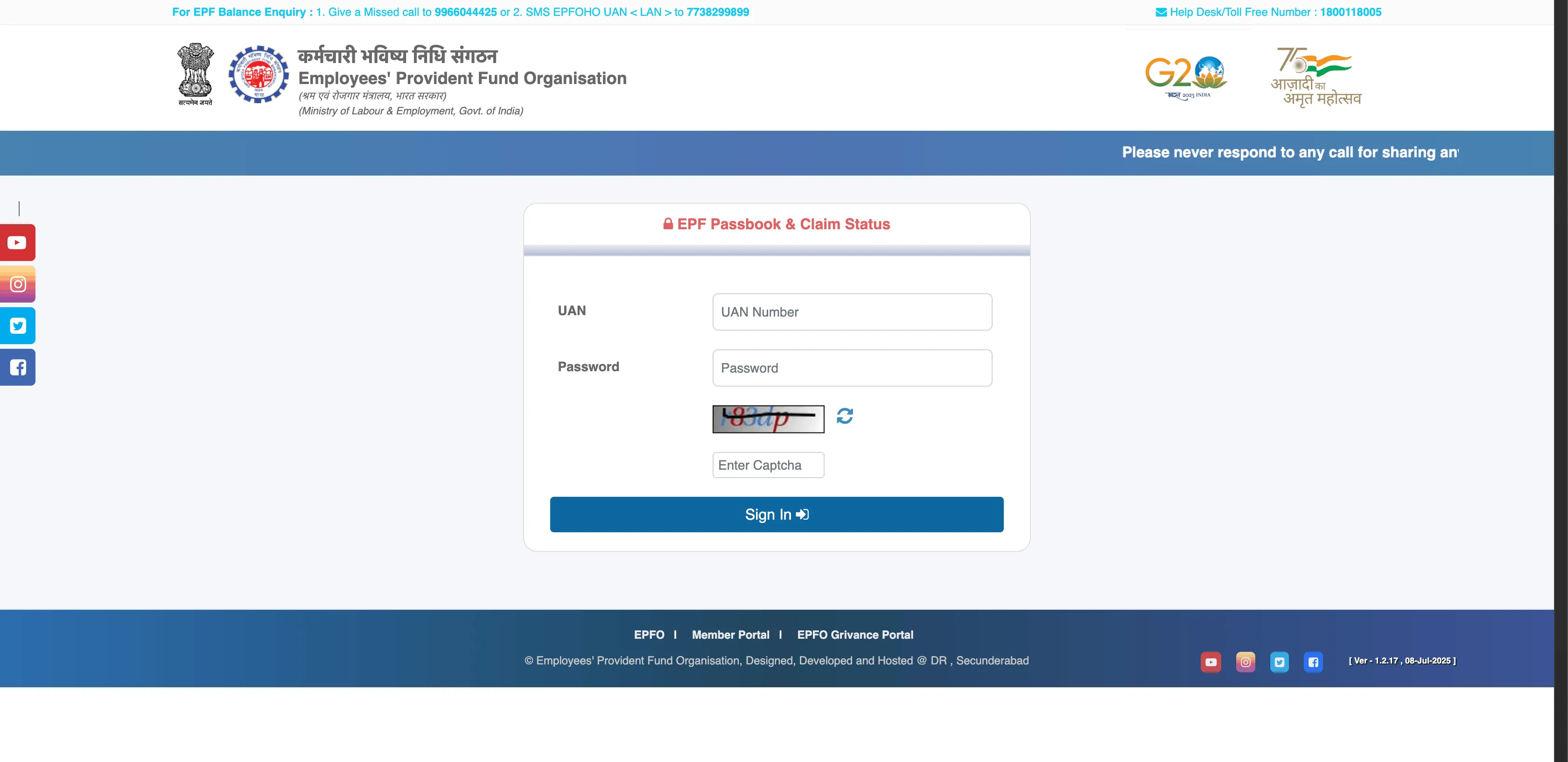
The official passbook portal provides the most detailed view of your account. (Make sure you have completed your UAN registration first). Follow our annotated UI guide to check your balance securely.
2. ईपीएफ सदस्य पासबुक (EPFO Passbook)
आधिकारिक ई-पासबुक पोर्टल पर आप अपने पीएफ खाते का पूरा विवरण और ब्याज (Interest) चेक कर सकते हैं। इसके लिए आपका UAN एक्टिवेट होना आवश्यक है।
Step 1: Portal Login चरण 1: पोर्टल लॉगिन
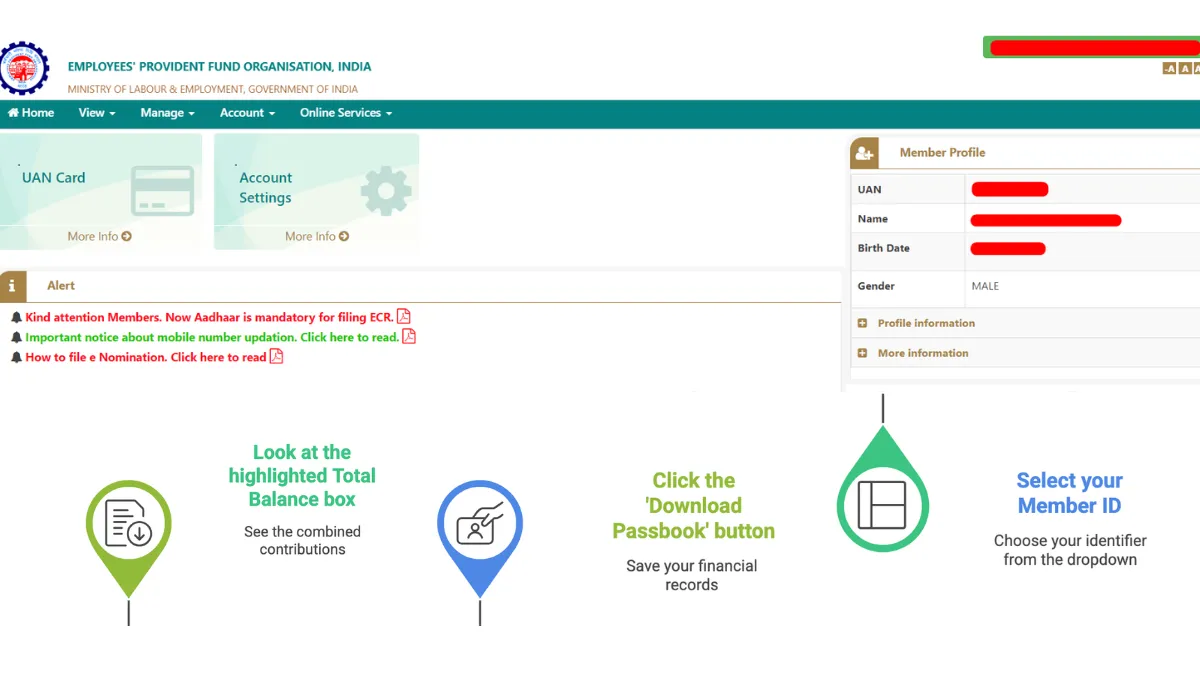
Step 2: Viewing Your Balance चरण 2: अपना पीएफ बैलेंस देखें
3. SMS Service
Perfect for users without a smartphone or active internet connection. Get your PF balance and last contribution details via a simple text message.
3. एसएमएस सेवा (SMS Service)
बिना स्मार्टफोन या इंटरनेट कनेक्शन वाले उपयोगकर्ताओं के लिए उत्तम। एक साधारण टेक्स्ट संदेश के माध्यम से अपना पीएफ बैलेंस विवरण प्राप्त करें।
*For Hindi, replace 'ENG' with 'HIN' (Example: EPFOHO UAN HIN).
*हिंदी के लिए 'ENG' के स्थान पर 'HIN' लिखें (उदाहरण: EPFOHO UAN HIN)।
Other supported languages: PUN, GUJ, MAR, KAN, TEL, TAM, MAL, and BEN.
अन्य समर्थित भाषाएँ: PUN, GUJ, MAR, KAN, TEL, TAM, MAL, और BEN.
4. Missed Call
The fastest and most universally accessible way to get your balance. Just dial the toll-free administrative number and wait for the call to disconnect automatically.
4. मिस्ड कॉल सेवा (Missed Call)
बिना किसी शुल्क के अपना पीएफ बैलेंस जानने का सबसे तेज़ तरीका। बस नीचे दिए गए टोल-फ्री नंबर पर कॉल करें।
- Ensure you are calling strictly from the mobile number registered with your UAN.
- The call will automatically disconnect after 2 rings (zero charges applied).
- You will receive your detailed balance summary via SMS within 30 to 60 seconds.
- सुनिश्चित करें कि आप केवल अपने रजिस्टर्ड मोबाइल नंबर से ही कॉल कर रहे हैं।
- 2 रिंग के बाद कॉल अपने आप कट जाएगी (कोई चार्ज नहीं लगेगा)।
- आपको 30 से 60 सेकंड के भीतर एसएमएस के माध्यम से पीएफ बैलेंस विवरण प्राप्त होगा।
Understanding Your E-Passbook & SMS Statements
Don't get confused by the numbers. Below is a real-world visualization of how your monthly EPF contributions are divided, plus solutions for common statement discrepancies.
Monthly Split Mechanics
When you inspect your downloadable PDF E-Passbook statement, your basic pay deductions (12%) and company matches are mathematically dispersed into three separate columns:
| Wage Month | Transaction Type | EE Share (12%) | ER Share (3.67%) | EPS Share (8.33%) |
|---|---|---|---|---|
| Mar-2026 | Monthly ECR match | ₹1,800 | ₹550 | ₹1,250 |
| Feb-2026 | Monthly ECR match | ₹1,800 | ₹550 | ₹1,250 |
| Interest Run | FY 2025 Interest Credit | ₹5,130 | ₹1,560 | - (No Pension Int) |
Real-Time SMS Responses
When utilizing the offline SMS check (`7738299899`), the government server parses your registered mobile and immediately responds with a structured summary matching the mockup below:
Your UAN 100869581022 details are:
Name: RAKESH KUMAR SHARMA
DOB: 12-OCT-1991
Last Cont: ₹1,800 (Wages Month: MAR-26)
Total EE Bal: ₹64,280
Total ER Bal: ₹19,650
KYC Seeded: Aadhaar (Yes), Bank (Yes), PAN (Yes).
⚠️ Why is my PF balance not updating?
- Employer ECR Filing Delay: Companies have until the 15th of each month to file electronic return challans. If your balance doesn't show the previous month, check if your HR delayed payment.
- EPFO Interest Run Delay: Official interest runs (e.g. 8.25% credit) are done in batches at the close of the financial year. It frequently takes 2–4 months for interest credits to dynamically reflect in passbook statements.
- Establishment Default Audits: If you suspect contribution default, visit the official unified portal and run a search on the Establishment Search Portal. This gives you a clear public view of your company's payment dates and defaults.
Advanced EPFO Balance Check Troubleshooting Matrix
Checking your Employees' Provident Fund balance may occasionally fail due to portal maintenance, authentication conflicts, or incorrect demographic seeding. Below is our verified compliance action guide for every major balance error:
1. Error: "UAN is Not Activated" or Credentials Rejected
Root Cause: Before your UAN can fetch balance statements from the API or portal, you must complete the official OTP verification. Newly assigned UANs from employers remain inactive by default.
Resolution: Head to our UAN Activation Guide, enter your 12-digit UAN, Aadhaar, and registered phone to get your authorization pin. Wait exactly 6 hours after activation for the database to sync before attempting a balance check.
2. Error: "Mobile Number Mismatch" (SMS/Missed Call fails)
Root Cause: The offline gateways (SMS `7738299899` and Missed Call `011-22901406`) automatically query the database using the caller's incoming CID. If your call originates from a number not seeded to your UAN, the system will discard the query for security.
Resolution: Login to the Unified Member Portal, go to Manage → Contact Details, and verify your registered mobile. If it doesn't match your Aadhaar mobile, trigger a change request.
3. Error: "EPF Passbook Service Unavailable / Gateway Timeout"
Root Cause: The official EPFO passbook database handles over 300 million active members. During salary cycles (1st to 7th of every month) or when interest rates are credited, the server frequently suffers from severe gateway congestion.
Resolution: Avoid checking your balance between 10:00 AM and 5:00 PM on weekdays. Query the database using the UMANG App or SMS Gateway instead, as these leverage direct administrative channels that bypass public portal traffic.
Scenario-Based Balance Checking Guide
Salaried professionals routinely face unique scenarios depending on their employment status. Follow these tactical scenario-based workarounds:
Scenario A: How to check PF balance without a UAN / Registered Mobile
If you do not know your UAN or have lost access to your registered mobile number, you cannot use the online passbook portal directly.
The Seeding Workaround:
1. Retrieve your UAN using the "Know Your UAN" tool on the Member Portal by entering your Aadhaar number and PAN.
2. If your mobile number has changed, visit your employer's HR compliance desk. They can update your mobile number directly in the unified employer interface using an e-Sign approval. Once updated, you can instantly regain full control.
Scenario B: How to check balances across multiple historical employers
Your Universal Account Number remains identical, but each employer assigns you a unique Member ID. When you check your balance on the official portal, you will see a drop-down menu containing all your active and closed Member IDs.
The Transfer Requirement: Do not leave balances scattered across historical IDs. Accumulated EPF balances from old companies do not automatically merge; they must be transferred online using Online Services → One Member - One EPF Account (Transfer Request). Pension service lines will be consolidated, ensuring a secure and correct eventual EPS-95 pension calculation.
Scenario C: How to track and audit employer contribution defaults
Per the Employees' Provident Funds Scheme, employers must deposit your 12% deduction and their matching shares by the 15th of the succeeding month. If your passbook shows missing wage months, your employer may be defaulting on deposits, which is a criminal offense under Indian labor law.
Compliance Audit Steps: Use the public Establishment Search Portal to check if your company has generated monthly Challan (ECR) receipts. If they have defaulted, register an official grievance using the EPFiGMS Portal with your passbook statement as evidence to initiate a regional recovery audit.
How EPF Interest is Mathematically Calculated
The proposed interest rate for FY 2025-26 is fixed at 8.15%. While interest is officially credited to your passbook at the close of the financial year, the calculations are mathematically computed on your monthly running balances:
The Mathematical Interest Formula:
For example, if your running balance for a specific month is ₹1,00,000, your interest accrued for that month is:
(₹1,00,000 * 8.15) / 1200 = ₹679.17.
At the end of the year, the sum of all 12 monthly interest calculations is added to your total EE and ER balances respectively.
For a full overview of all EPFO services — including UAN activation, KYC update, and claim filing — visit our EPFO member guide for India.
सभी EPFO सेवाओं की जानकारी के लिए हमारी ईपीएफओ गाइड पर जाएं।
People also ask
Official EPFO Digital Directory
Direct secure gateways to official government portals for EPFO compliance checks, grievances, and digital transactions.
Is this useful?
Your quick rating helps us improve these EPFO guides.
Thank you — we appreciate your feedback.